
The VR market has grown up. With Meta Quest headsets sitting under Christmas trees, PlayStation VR2 targeting a serious gaming audience, and Apple Vision Pro pushing the spatial computing conversation forward, virtual reality is no longer a niche experiment. Studios that figure out VR game development early are positioning themselves well for a market that’s still finding its ceiling.
But here’s the honest truth: a lot of VR games fail — not because VR is too hard, but because teams approach it like a standard game port with a headset bolted on at the end. Comfort gets deprioritized. Interaction design gets borrowed from flat-screen games. Performance targets get missed. The result is a game that technically runs in VR but feels wrong.
This guide covers everything you need to know about how to develop a VR game — concept selection, platform choices, engine decisions, interaction design, testing, and budgeting — with enough depth to help you make better decisions at every stage.
What Is VR Game Development?
Virtual reality game development is the process of building interactive experiences designed to run on VR headsets with motion-tracked controllers — but that one-sentence definition undersells how different it actually is from traditional game development.
When players put on a headset, they’re not looking at a screen anymore — they’re inside the world. They can physically turn their heads to check corners, reach out and grab objects, and walk around (within their playspace). That level of presence is genuinely powerful, and it’s also genuinely demanding to build for.
Modern VR development combines real-time 3D graphics, motion tracking, spatial audio, physics-based interactions, and — increasingly — hand tracking and gesture recognition, all running at frame rates that would embarrass a console developer. The performance bar is unforgiving because dipping below it doesn’t just look bad: it makes players feel sick.
The goal isn’t to create a game that works in VR. It’s to create something that feels like it was built for VR — where the medium is the point, not an afterthought.
How to Make a VR Game: A Step-by-Step Overview
Here’s how a VR project typically moves from idea to shipped product:
1. Define the game concept and confirm VR adds genuine value to the core loop.
2. Choose a target platform (or platforms) and understand the hardware constraints.
3. Select a game engine suited to your team’s expertise and project goals.
4. Design VR-specific interactions, movement systems, and UX from scratch — don’t port these from flat-screen games.
5. Create optimized assets and environments built to platform performance specs.
6. Build and iterate on core mechanics through rapid prototyping.
7. Run extensive playtesting focused on comfort, tracking, and interaction quality.
8. Optimize performance until your frame rate is locked and stable.
9. Launch, gather data, and support the game post-release.
Every phase here exists in traditional game development — but in VR, every phase has additional constraints baked in. Interaction design can’t borrow from keyboard or controller conventions. Asset budgets are tighter. Testing requires people who’ve never touched VR before. The steps are the same; the execution is materially different.
Choosing the Right VR Game Concept
The first real decision in the VR game development process isn’t technical — it’s conceptual. Not every genre benefits from VR, and chasing the headset just because it’s available is a trap.
The genres that consistently work in VR are the ones where physical presence changes the experience in a meaningful way:
• Action and adventure — melee combat, archery, and traversal feel fundamentally different when your body is involved
• Simulation — flight sims, driving sims, procedural crafting, and training applications
• Rhythm games — Beat Saber proved this category; the physicality is the product
• Puzzle games — spatial reasoning and object manipulation shine in VR
• Fitness applications — the movement-as-gameplay loop is a natural fit
• Social VR and multiplayer hangouts
• Educational and training simulations
Good VR game design starts with one honest question: does VR improve the core interaction, or does it just complicate it? A first-person shooter might technically work in VR, but if the gun handling feels worse than a mouse and keyboard, VR hasn’t added anything.
Practically speaking, the strongest early-stage VR projects start with a single highly polished interaction loop — one mechanic that feels exceptional in VR — before scaling outward. Scope creep is brutal in this medium because every additional mechanic needs bespoke interaction design.
Selecting the Right VR Platform
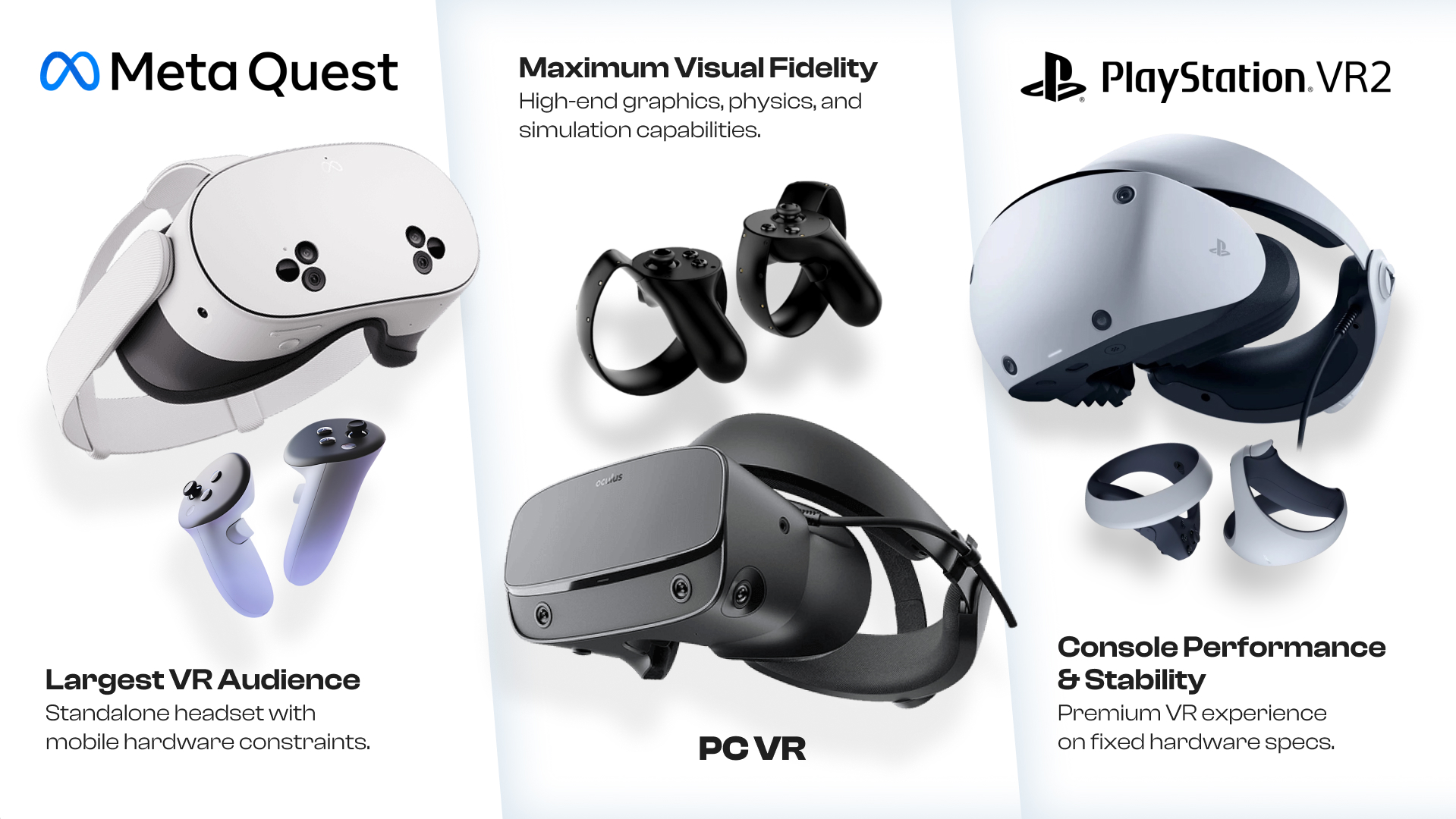
Platform choice shapes almost every technical and commercial decision that follows. These are the main ecosystems you’ll be choosing between:
Meta Quest
Meta Quest game development is currently the most accessible path into the VR market. The Quest line has the largest standalone VR install base, and the all-in-one form factor (no PC required) meaningfully lowers the barrier for players. The tradeoff is a mobile-class GPU — think Snapdragon XR2 or XR2 Gen 2 — which puts real constraints on poly counts, draw calls, and lighting fidelity. If you’re targeting Quest, performance optimization isn’t a polish pass; it’s a core design constraint from day one.
PC VR — SteamVR, Valve Index, HTC Vive
PC VR gives you access to significantly more GPU headroom — and with it, larger environments, more complex shaders, advanced physics, and denser NPC setups. The audience is smaller and more enthusiast-leaning, but it tends to skew toward higher purchase intent and longer play sessions. For simulation projects, horror experiences, or anything where visual fidelity is foundational to the product, PC VR is the natural home.
PlayStation VR2
PSVR2 offers console-grade performance in a controlled hardware environment — which is actually a gift to developers. You’re optimizing for one spec, not a range of PC configurations. The foveated rendering support and haptic feedback in the controllers are genuine differentiators. For studios targeting premium single-player experiences with a curated feel, it’s a serious option worth evaluating.
Cross-Platform VR Development
Cross-platform VR development broadens your addressable market but adds meaningful overhead — you’ll need separate optimization passes for each device category, additional QA cycles, and in some cases platform-specific certification. Most studios approach this by building to Quest constraints first (the most restrictive) and then unlocking higher-fidelity features for PC VR builds. That way the core game works everywhere and premium hardware benefits from the headroom rather than being designed down to it.
Choosing a Game Engine for VR Development
Unity VR Development
Unity VR development is the most common starting point for VR teams across the industry, especially for indie and mid-size studios. Unity’s XR Interaction Toolkit has matured significantly, and the Meta XR SDK integration is well-documented. The asset pipeline flexibility, combined with a large community and extensive third-party tooling, means most practical problems have already been solved and documented somewhere. If your team is picking up VR for the first time, Unity is the lower-friction choice.
Unreal Engine VR Development
Unreal Engine VR development becomes the better argument when visual quality is non-negotiable — architectural visualizations, high-fidelity simulation environments, or premium entertainment experiences targeting PC VR and PSVR2. Lumen and Nanite can be configured for VR with the right settings, and the Blueprint scripting system makes rapid prototyping accessible without writing everything in C++. The tradeoff is a steeper learning curve and a heavier engine overhead.
Supporting Tools and SDKs
Beyond the engine itself, a typical VR stack includes OpenXR for cross-platform input abstraction, the Meta XR SDK or SteamVR SDK depending on target platforms, VRTK for interaction scaffolding, Photon or Normcore for multiplayer networking, and a spatial audio framework like Resonance Audio or Steam Audio. The right combination depends on your target hardware and what your team already knows.
Designing Immersive VR Gameplay
VR Interaction Design
Strong VR interaction design starts from the same principle: default to physical behavior. If there’s a door in your game, players should reach for the handle and pull it — not press a button. If there’s a gun, they should physically pick it up, rack the slide if it’s a pistol, and feel a haptic thud when it fires. These aren’t bells and whistles; they’re the reason people are wearing a headset instead of sitting at a desk.
The interactions that fail in VR are usually the ones lifted straight from flat-screen conventions — radial menus that require precise hand stability, physics objects that snap rather than feel weight-appropriate, or locomotion systems clearly designed by someone who hasn’t gotten motion sick themselves. Every interaction needs to be designed in VR, tested in VR, and refined based on playtester feedback from people who haven’t played the game before.
VR Game Mechanics
The best VR game mechanics leverage the thing flat-screen games can’t do: they make you feel physically present. Physical object manipulation, gesture-based actions, environmental interaction that responds to body position, and room-scale exploration that rewards actual movement — these are the categories worth investing in. The sword fight example is the obvious one: in a flat-screen game, sword fighting is about timing button presses; in VR, it’s about footwork, guard angles, and committing your actual body to a swing. That’s a fundamentally different product.
Comfort and Motion Sickness Prevention
VR motion sickness prevention isn’t a feature you add — it’s a constraint you design within. The core problem is sensory conflict: when visual motion doesn’t match vestibular signals, the brain starts asking uncomfortable questions. The solutions are well-established: teleport locomotion for movement-sensitive players, snap turning instead of smooth rotation, vignetting during locomotion, and above all else — consistent, stable frame rates. A single dropped frame at the wrong moment can ruin an otherwise comfortable experience.
Build comfort options in from the start. Players have wildly different tolerances. Some people can free-locomote through a fast-paced action game without a second thought; others get nauseous watching someone else play. A well-designed comfort system doesn’t just protect new players — it broadens your addressable audience.
Building and Testing a VR Game
Once core systems are designed and prototyped, full production involves all the expected pillars: programming gameplay systems, environment creation, character and animation work, audio integration, UI development, and — if applicable — multiplayer infrastructure. None of that is fundamentally different from a standard game project.
Where VR production diverges is in asset budgeting. High-quality 3D asset creation for VR games is a genuine specialty — not because the assets look different, but because the polygon counts, texture resolutions, draw call structures, and LOD strategies all need to meet tighter targets than PC or console work, especially on standalone hardware. Many studios working on VR projects bring in specialized partners for art production. Professional 3D Art Services can accelerate this substantially, delivering assets that hit both the visual bar and the technical performance targets without requiring your engineering team to spend half their time auditing geometry counts.
VR Game Testing
VR game testing is more demanding than testing a traditional game, and the gap is often underestimated. You’re not just checking for bugs — you’re evaluating physical comfort, tracking fidelity, interaction consistency, performance under load, and the subjective experience of presence. A bug that causes a half-second hitch in a flat-screen game is annoying; the same hitch in VR might cause a player to take the headset off.
Critical things to evaluate:
• Comfort and motion sickness across different locomotion types and session lengths
• Controller tracking reliability — including edge cases like fast motion, occlusion, and non-standard play spaces
• Hand interaction edge cases — objects that can be grabbed in ways you didn’t intend, or that clip through surfaces
• Performance stability across all supported hardware configurations
• Multiplayer synchronization, if applicable
• First-session experience — onboarding must work for people who have never used a VR headset
That last point is consistently underestimated. Get playtesters who are new to VR. The issues they find are usually invisible to experienced developers who’ve forgotten what it was like to put on a headset for the first time.
Common Challenges in VR Game Development
Most VR projects don’t fail because of impossible technical problems. They fail because teams underestimate the scope of solving known problems well. Here’s where the time actually goes:
Performance Constraints
VR demands high, stable frame rates — typically 72 Hz minimum on standalone, 90 Hz or higher on PC VR. Every optimization shortcut that’s acceptable on a flat-screen game needs to be re-evaluated in VR. Dynamic lighting, particle effects, and complex physics that run fine at 60 fps on a monitor can blow your headset frame budget in ways you won’t catch until you’re already deep in production.
Interaction Systems Take Longer Than Expected
A door handle in a flat-screen game is a trigger volume and an animation. In VR, it needs to respond correctly whether you grab it from the left, the right, above, below, with your dominant hand or your off hand, while moving, while crouching, and while another player is also trying to open it. That’s one object. Every interactable in your game carries this overhead. Teams that plan for ‘standard dev time plus VR polish’ consistently underscope this.
Hardware Fragmentation
The Quest 2, Quest 3, Quest Pro, PSVR2, Index, and Vive all have different controllers, different tracking volumes, different resolutions, and different GPU capabilities. Supporting more than one device class is a genuine multiplier on your QA and optimization work.
Player Comfort Is a Moving Target
Comfort tolerance varies enormously across players, and a setting that works for 80% of your audience may still generate negative reviews from the 20% who get motion sick in your locomotion system. Getting this right requires real playtesting data — not assumptions.
Content Scope vs. Polish
VR players are sensitive to inconsistency. A polished core interaction followed by rough edges elsewhere creates a jarring cognitive dissonance that flat-screen games can absorb more easily. A smaller but cohesive experience almost always outperforms a larger game with uneven quality.
How Much Does It Cost to Make a VR Game?
The cost to create a VR game varies significantly based on scope, content volume, platform targets, and team composition. These figures provide a reasonable orientation:
| Project Type | Estimated Budget |
| Simple VR prototype | $20,000 – $75,000 |
| Small indie VR game | $75,000 – $300,000 |
| Mid-scale commercial VR project | $300,000 – $1M+ |
| Large multiplayer VR experience | $1M – $10M+ |
The main cost drivers are team size and duration, art production volume (especially on standalone where every asset needs careful optimization), multiplayer infrastructure if applicable, QA and device testing, and platform certification and compliance.
One practical note: budget for post-launch support. VR platforms update firmware, headset SDKs change, and the player base expects fixes. A shipped game is not a finished game.
Why Work with a VR Game Development Company?
Many studios entering VR for the first time choose to partner with a specialist VR game development company rather than building all the institutional knowledge in-house. The logic is straightforward: the mistakes that VR projects make — interaction systems designed for flat screens, comfort issues caught late, platform optimization underscoped — are well-documented at this point. A team that has shipped multiple VR titles has already made most of those mistakes on someone else’s budget.
The practical value a specialist partner brings includes production pipeline experience for VR-specific asset workflows, platform certification knowledge, performance optimization for standalone and PC hardware, and interaction design that’s been validated through real playtesting — not theoretical frameworks.
At Stepico, VR game development projects draw on cross-disciplinary expertise across engineering, art production, game design, and QA. Whether you need help getting a prototype to a fundable state, need a production partner to scale an existing project, or are looking for a team to handle full-cycle development — the goal is the same: reduce the technical risk that comes with building in an unforgiving medium.
Conclusion
Learning how to make a VR game is less about mastering a new set of tools and more about rethinking assumptions you’ve built up from flat-screen development. Interaction design, performance targets, asset pipelines, testing protocols, and even the way you scope a project — all of it needs to be reconsidered for a medium where the player is physically inside the experience.
The studios that succeed in VR are the ones that treat it as its own discipline rather than an extension of what they already know. That doesn’t mean starting from zero — a lot of the foundational game development skill set transfers cleanly. But it does mean being honest about where the gaps are and filling them deliberately.
If your team is exploring VR and you want to move faster than trial-and-error allows, talk to Stepico. Whether you’re at the concept stage or already in production, an experienced team can help you avoid the mistakes that slow VR projects down — and make the most of a medium that still has a lot of ceiling left.
FAQ
How long does it take to develop a VR game?
A focused small-scope VR project can come together in a few months. A mid-scale commercial title realistically takes one to two years. Large multiplayer VR experiences tend to run two to three years or longer. Timeline is primarily driven by interaction complexity and content volume — both of which scale quickly in VR.
What engine is best for VR game development?
Unity VR development is the more accessible option with strong Quest support and a large ecosystem of VR-specific tooling. Unreal Engine VR development is the better argument when high-end visual fidelity is a core requirement. Both are widely used in production. The honest answer is: whichever one your team knows better, unless there’s a specific technical reason to switch.
Is VR game development harder than traditional game development?
Not harder overall, but different in specific ways that catch teams off-guard. The interaction design overhead is real, the performance constraints are tighter, and testing is genuinely more involved. Teams that account for these differences in their planning do fine. Teams that don’t tend to find out the hard way late in production.
Can a VR game be released on multiple platforms?
Yes. Cross-platform VR development across Meta Quest, SteamVR, and PlayStation VR ecosystems is common and achievable. It adds QA, optimization, and certification overhead — but it also meaningfully expands your addressable audience. Most studios start with one platform and add others once the core experience is stable.
Do VR games require special testing?
VR game testing covers comfort, tracking accuracy, interaction quality, performance stability, and hardware compatibility — all of which require testing methodologies that don’t exist in flat-screen development. The most important thing most teams underestimate: get playtesters who have never used a VR headset. They find problems that experienced VR users have stopped noticing.